What is ansible-navigator
ansible-navigator is the new command line utility (CLI) introduced in Ansible Automation Platform 2, for running and developing Ansible automation content. ansible-navigator can be used to execute a playbook as follows.
$ ansible-navigator run site.yaml -m stdout
New to Ansible Automation Platform 2 ? Read Introducing Red Hat Ansible Automation Platform 2.1 for more details.
ansible-navigator also has the Text User Interface (TUI) which will help you to visualize the Ansible execution better than the ansible-playbook command.
$ ansible-navigator run site.yaml
Installing ansible-navigator
Ansible navigator can be installed using multiple methods as follows.
## Using Python
$ python3 -m pip install ansible-navigator --user

## Using package manager on RHEL
## A subscription is required
$ dnf install \
  --enablerepo=ansible-automation-platform-2.2-for-rhel-8-x86_64-rpms \
  ansible-navigator
Refer to the navigator installation document or the Red Hat documentation to learn more.
ansible-playbook to ansible-navigator
The changes are very easy to adopt and commands are self-explanatory subsets.
| Old individual commands | ansible-navigator subcommands |
|---|---|
| `ansible` | `ansible-navigator exec -- ansible` |
| `ansible-playbook` | `ansible-navigator run` |
| `ansible-doc` | `ansible-navigator doc` |
| `ansible-config` | `ansible-navigator config` |
| `ansible-inventory` | `ansible-navigator inventory` |
| `ansible-inventory` | `ansible-navigator inventory` |
| `ansible-builder` | `ansible-navigator builder` |
| `ansible-galaxy` | `ansible-navigator exec -- ansible-galaxy …` |
| `ansible-lint` | `ansible-navigator lint` |
| `ansible-test` | `ansible-navigator exec -- ansible-test …` |
| `ansible-vault` | `ansible-navigator exec -- ansible-vault …` |
ansible-navigator –help
ansible-navigator --help will show the details help page of ansible-navigator utility including the options, arguments and subcommands to available.
$ ansible-navigator --help
usage: ansible-navigator [-h] [--version] [--rad ANSIBLE_RUNNER_ARTIFACT_DIR] [--rac ANSIBLE_RUNNER_ROTATE_ARTIFACTS_COUNT] [--rt ANSIBLE_RUNNER_TIMEOUT]
                         [--cdcp COLLECTION_DOC_CACHE_PATH] [--ce CONTAINER_ENGINE] [--dc DISPLAY_COLOR] [--ecmd EDITOR_COMMAND] [--econ EDITOR_CONSOLE]
                         [--ee EXECUTION_ENVIRONMENT] [--eei EXECUTION_ENVIRONMENT_IMAGE]
                         [--eev EXECUTION_ENVIRONMENT_VOLUME_MOUNTS [EXECUTION_ENVIRONMENT_VOLUME_MOUNTS ...]] [--la LOG_APPEND] [--lf LOG_FILE] [--ll LOG_LEVEL] [-m MODE]
                         [--osc4 OSC4] [--penv PASS_ENVIRONMENT_VARIABLE [PASS_ENVIRONMENT_VARIABLE ...]] [--pp PULL_POLICY]
                         [--senv SET_ENVIRONMENT_VARIABLE [SET_ENVIRONMENT_VARIABLE ...]]
                         {subcommand} --help ...

optional arguments:
  -h, --help            show this help message and exit

...output omitted...
ansible-navigator -The TUI Dashboard
ansible-navigator welcome will show the text user interface (TUI) of Ansible Navigator with instructions and subcommands. (You will get the same interface when you execute ansible-navigator without any arguments)
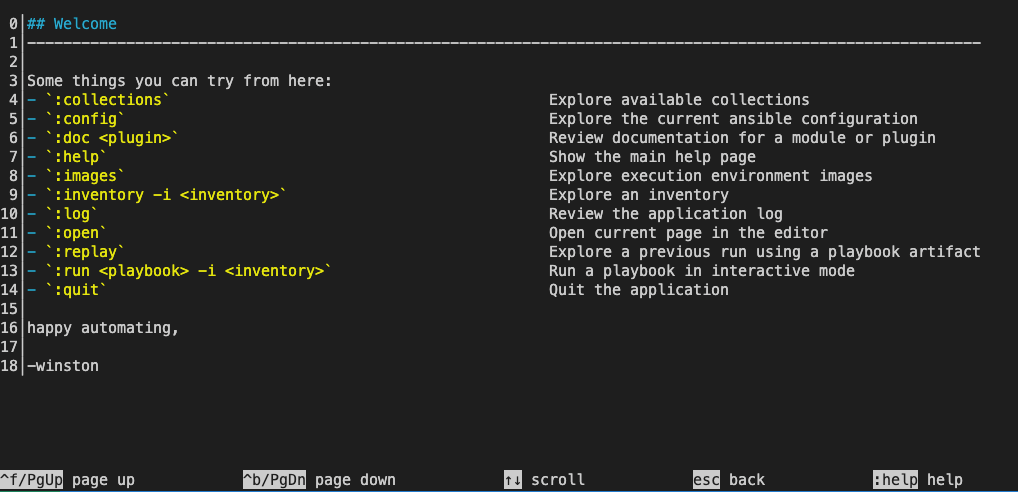
You can execute the subcommands from the same TUI like a dashboard.
:doc -Checking documentation
:doc dnf
It will load the result in the same TUI interface.
DNF (MODULE)
  0│---
  1│doc:
  2│  author:
  3│  - Igor Gnatenko (@ignatenkobrain) <i.gnatenko.brain@gmail.com>
  4│  - Cristian van Ee (@DJMuggs) <cristian at cvee.org>
  5│  - Berend De Schouwer (@berenddeschouwer)
  6│  - Adam Miller (@maxamillion) <admiller@redhat.com>
  7│  collection: ansible.builtin
  8│  description:
  9│  - Installs, upgrade, removes, and lists packages and groups with the I(dnf) package
 10│    manager.
 11│  filename: /usr/lib/python3.8/site-packages/ansible/modules/dnf.py
 12│  has_action: false
 13│  module: dnf
 14│  notes:
 15│  - When used with a `loop:` each package will be processed individually, it is much
 16│    more efficient to pass the list directly to the `name` option.
 17│  - Group removal doesn't work if the group was installed with Ansible because upstream
 18│    dnf's API doesn't properly mark groups as installed, therefore upon removal the
 19│    module is unable to detect that the group is installed (https://bugzilla.redhat.com/show_bug.cgi?id=1620324
...output omitted...
We can also use the execution environment here and see the documentation from included content as follows.
$ ansible-navigator doc -l -eei ee-supported-rhel8 -
:run – Execute the playbook
:run site.yml
:quit – Exit from ansible-navigator
You can go back to the previous window at any time by pressing the Esc button. You can exit from the TUI at any time by Esc followed by :q (or :quit )
ansible-navigator Subcommands
Subcommands are available to use and replace old ansible-* utilities (eg: ansible-playbook , ansible-config etc).
Subcommands:
  {subcommand} --help
    collections         Explore available collections
    config              Explore the current ansible configuration
    doc                 Review documentation for a module or plugin
    images              Explore execution environment images
    inventory           Explore an inventory
    replay              Explore a previous run using a playbook artifact
    run                 Run a playbook
    welcome             Start at the welcome page
ansible-navigator config
List and explore the current ansible configuration.
$ ansible-navigator config
OPTION                        DEFAULT SOURCE  VIA     CURRENT VALUE
  0│ACTION_WARNINGS                  True default default True
  1│AGNOSTIC_BECOME_PROMPT           True default default True
  2│ALLOW_WORLD_READABLE_TMPFILES    True default default False
  3│ANSIBLE_CONNECTION_PATH          True default default None
  4│ANSIBLE_COW_ACCEPTLIST           True default default ['bud-frogs', 'bunny', 'cheese', 'daemon', 'default', 'd
  5│ANSIBLE_COW_PATH                 True default default None
  6│ANSIBLE_COW_SELECTION            True default default default
  7│ANSIBLE_FORCE_COLOR              True default default False
  8│ANSIBLE_NOCOLOR                  True default default False
  9│ANSIBLE_NOCOWS                   True default default False
 10│ANSIBLE_PIPELINING               True default default False
 11│ANY_ERRORS_FATAL                 True default default False
 12│BECOME_ALLOW_SAME_USER           True default default False
^f/PgUp page up       ^b/PgDn page down       ↑↓ scroll       esc back       [0-9] goto       :help help
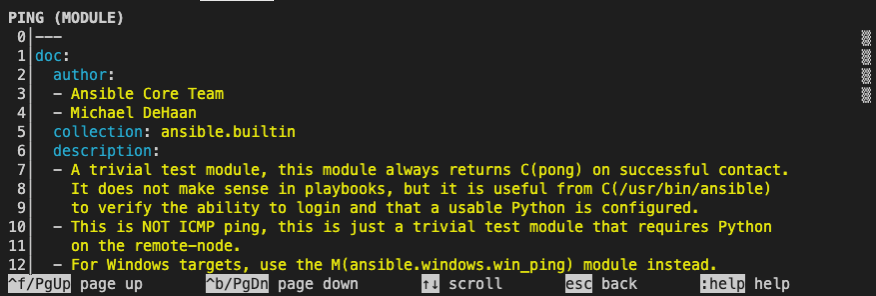
ansible-navigator doc
Explore the ansible documentation for modules and plugins.
$ ansible-navigator doc ping
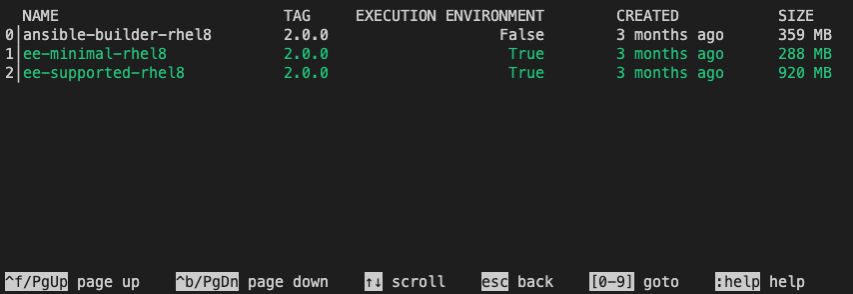
ansible-navigator images
List and explore container images for the Ansible execution environment.
$ ansible-navigator images
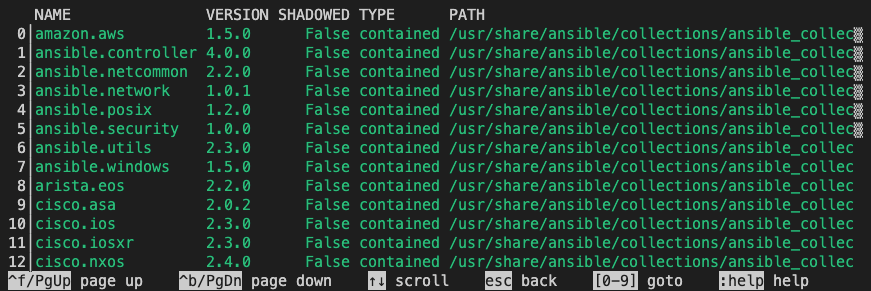
ansible-navigator collections
List and explore available collections.
$
ansible-navigator collections
ansible-navigator run
Execute the playbook with a more summarised output instead of logs and details.
$ ansible-navigator run site.yml -m stdout
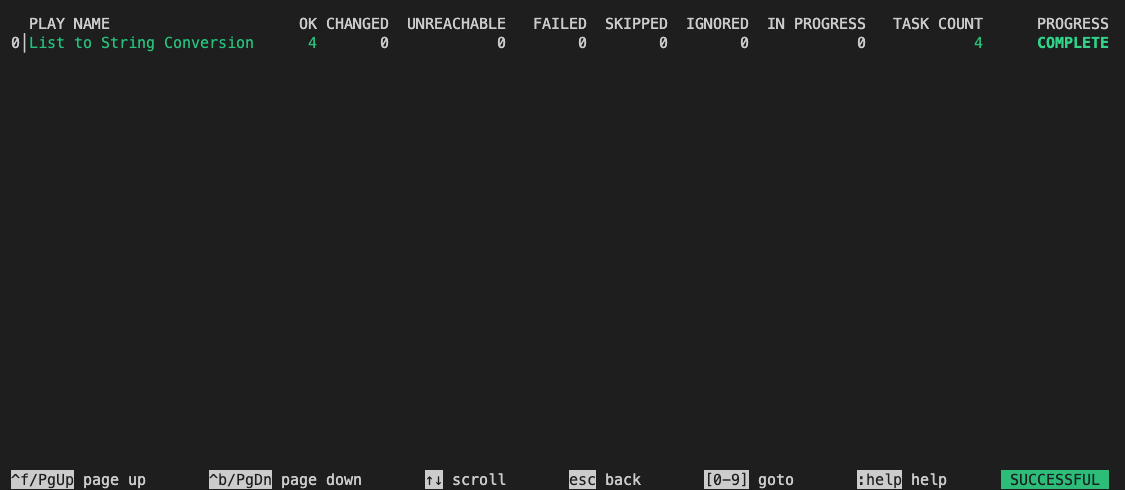
If you want to get the standard output the same as the ansible-playbook command, then add -m stdout at the end of your ansible-navigator run command as below.
$ ansible-navigator run site.yml -m stdout
ansible-navigator exec
Run a command within an execution environment
# Check Ansible version inside the Execution Environment

$ ansible-navigator exec -- ansible --version

ansible [core 2.15.3]
  config file = /home/iamgini/ansible-bau/ansible-jboss-automation/ansible.cfg
  configured module search path = ['/home/runner/.ansible/plugins/modules', '/usr/share/ansible/plugins/modules']
  ansible python module location = /usr/lib/python3.9/site-packages/ansible
  ansible collection location = /home/iamgini/ansible-bau/ansible-jboss-automation/collections:/home/runner/.ansible/collections/ansible_collections:/usr/share/ansible/collections/ansible_collections
  executable location = /usr/bin/ansible
  python version = 3.9.16 (main, May 31 2023, 12:21:58) [GCC 8.5.0 20210514 (Red Hat 8.5.0-18)] (/usr/bin/python3.9)
  jinja version = 3.1.2
  libyaml = True

# Execute an adhoc command

$ ansible-navigator exec -- ansible all -m ping

localhost | SUCCESS => {
    "ansible_facts": {
        "discovered_interpreter_python": "/usr/libexec/platform-python"
    },
    "changed": false,
    "ping": "pong"
}
rhel8-jboss | SUCCESS => {
    "ansible_facts": {
        "discovered_interpreter_python": "/usr/libexec/platform-python"
    },
    "changed": false,
    "ping": "pong"
}
ansible-navigator replay
You can replay the execution by using the artefacts from the previous run but you need to enable the saving of artefacts in the ansible-navigator.yml configurations.
---
ansible-navigator:
  playbook-artifact:
    enable: True
    replay: artifacts/ansible_artifact.json
    save-as: artifacts/ansible_artifact.jsonl
When you execute the ansible-navigator run artefacts will be saved in the location.
$ ls -l artifacts/
total 36
-rw-rw-r--. 1 rhel rhel 36560 Dec 12 07:53 ansible_artifact.jsonl
Now you can use this artefact to replay the execution and see the details.
$ ansible-navigator replay artifacts/ansible_artifact.jsonl
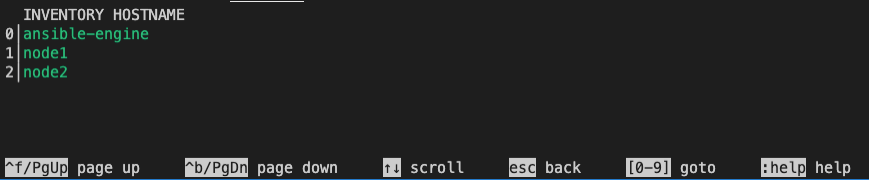
ansible-navigator inventory
List and explore the inventory details.

ansible-navigator settings
Review the current ansible-navigator settings and list sample settings file.
$  ansible-navigator settings --sample
---
ansible-navigator:
#   ansible:
#     config:
#       # Help options for ansible-config command in stdout mode
#       help: False
#       # Specify the path to the ansible configuration file
#       path: ./ansible.cfg
#     # Extra parameters passed to the corresponding command
#     cmdline: "--forks 15"
...<omitted for brevity>...
#   settings:
#     # Show the effective settings. Defaults, CLI parameters, environment
#     # variables, and the settings file will be combined
#     effective: False
#     # Generate a sample settings file
#     sample: False
#     # Generate a schema for the settings file ('json'= draft-07 JSON Schema)
#     schema: json
#     # Show the source of each current settings entry
#     sources: False
#   # Specify the IANA time zone to use or 'local' to use the system time
#   # zone
#   time-zone: UTC
Configure ansible-navigator
You can configure ansible-navigator on the project level by configuring ansible-navigator.yml in the project directory (same as ansible.cfg for project-specific configuration). For the ansible-navigator configurations, currently the following are checked and the first match is used:
ANSIBLE_NAVIGATOR_CONFIG(settings file path environment variable if set)./ansible-navigator(project directory)~/.ansible-navigator(home directory)
The settings file can be in JSON or YAML format.
You can configure the execution environments, development styles, and even the code editor details.
$ cat ansible-navigator.yml
---
ansible-navigator:
  execution-environment:
    container-engine: podman
    image: ee-supported-rhel8:2.0.0
    enabled: false

  playbook-artifact:
    save-as: /home/devops/playbook-artifacts/{playbook_name}-artifact-{ts_utc}.json

  logging:
    level: debug

  editor:
    command: code-server {filename}
    console: false

  playbook-artifact:
    enable: True
    replay: artifacts/ansible_artifact.json
    save-as: artifacts/ansible_artifact.jsonl
You can configure the file as per your project and development requirements. Eg: here the editor -> code-server helps to open the playbook in VSCode editor (Learn more about code server ) instead of editing the playbook in vim or nano.
$ code-server site.yml
Resources
- Check ansible-navigator GitHub repo and documentation for more details.
- Ansible Navigator Creator Guide
- Ansible Builder Guide
- What’s new in Ansible Automation Platform 2: automation content navigator (Ansible Blog)

Gineesh Madapparambath
Gineesh Madapparambath is the founder of techbeatly. He is the co-author of The Kubernetes Bible, Second Edition and the author of Ansible for Real Life Automation. He has worked as a Systems Engineer, Automation Specialist, and content author. His primary focus is on AI, Ansible Automation, Containerization (OpenShift & Kubernetes), and Infrastructure as Code (Terraform). (Read more: gineesh.com)


 Editorial